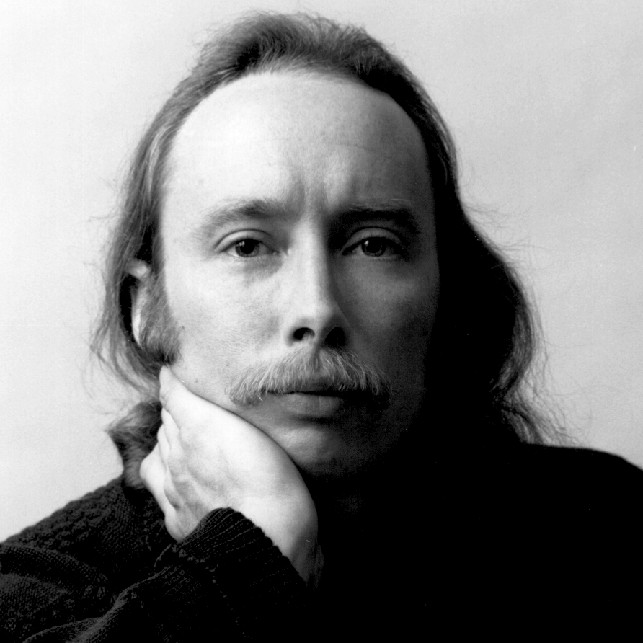
Nicholas C.K. Thorne

Born in Copenhagen in 1953, Nicholas C. K. Thorne came to the United States in 1963. He trained at the Berklee School of Music and New England Conservatory in Boston studying composition with William Thomas McKinley, John Heiss, Donald Martino, and, later at Tanglewood, with Gunther Schuller.Surrounded by a wide variety of musical styles from his earliest years, Thorne played both guitar and piano, performed in rock bands and jazz ensembles, and studied improvisation with Pat Metheny. An eclectic compositional style is marked by emotional directness and an irresistible rhythmic energy. His Three Love Songs (for solo piano) displays this spontaneous, nearly improvisatory style, eschewing any overt lyricism implied by the title. In other works that span genres of orchestral, chamber, and solo repertoire, the composer consistently links both tonality and atonality and popular and classical traditions.

Thorne's constant, close communion with nature is often a unifying element in his creative work. Compositions such as The Voices of Spring, Rain Sketches, or Songs from the Mountain evoke awe and mystery, capturing at times the "stony silence of the mountains" in block-like granitic harmonies or at other times the "linear vocal quality" of a brisk, northerly wind. Thorne has been commissioned by several orchestras and ensembles including The Philadelphia Orchestra for whom he wrote Revelations.
Featured Events

What’s a Rich Text element?

What’s a Rich Text element?

The rich text element allows you to create and format headings, paragraphs, blockquotes, images, and video all in one place instead of having to add and format them individually. Just double-click and easily create content.

The rich text element allows you to create and format headings, paragraphs, blockquotes, images, and video all in one place instead of having to add and format them individually. Just double-click and easily create content.

Static and dynamic content editing

Static and dynamic content editing

A rich text element can be used with static or dynamic content. For static content, just drop it into any page and begin editing. For dynamic content, add a rich text field to any collection and then connect a rich text element to that field in the settings panel. Voila!

A rich text element can be used with static or dynamic content. For static content, just drop it into any page and begin editing. For dynamic content, add a rich text field to any collection and then connect a rich text element to that field in the settings panel. Voila!

How to customize formatting for each rich text

How to customize formatting for each rich text

Headings, paragraphs, blockquotes, figures, images, and figure captions can all be styled after a class is added to the rich text element using the "When inside of" nested selector system.

Headings, paragraphs, blockquotes, figures, images, and figure captions can all be styled after a class is added to the rich text element using the "When inside of" nested selector system.

What’s a Rich Text element?

What’s a Rich Text element?

The rich text element allows you to create and format headings, paragraphs, blockquotes, images, and video all in one place instead of having to add and format them individually. Just double-click and easily create content.

The rich text element allows you to create and format headings, paragraphs, blockquotes, images, and video all in one place instead of having to add and format them individually. Just double-click and easily create content.

Static and dynamic content editing

Static and dynamic content editing

A rich text element can be used with static or dynamic content. For static content, just drop it into any page and begin editing. For dynamic content, add a rich text field to any collection and then connect a rich text element to that field in the settings panel. Voila!

A rich text element can be used with static or dynamic content. For static content, just drop it into any page and begin editing. For dynamic content, add a rich text field to any collection and then connect a rich text element to that field in the settings panel. Voila!

How to customize formatting for each rich text

How to customize formatting for each rich text

Headings, paragraphs, blockquotes, figures, images, and figure captions can all be styled after a class is added to the rich text element using the "When inside of" nested selector system.

Headings, paragraphs, blockquotes, figures, images, and figure captions can all be styled after a class is added to the rich text element using the "When inside of" nested selector system.